
Embedded content: Manage embedded chat clients
In the Control Center, you can configure the way embedded chats behave and are displayed on your website by configuring their parameters, according to your needs.
Important! When configuring this section, make sure that you select Save on the tab you just configured before moving on to another tab/section.
To manage the embedded chat client parameters:
- Go to
 Manage>Platform>Embedded content.
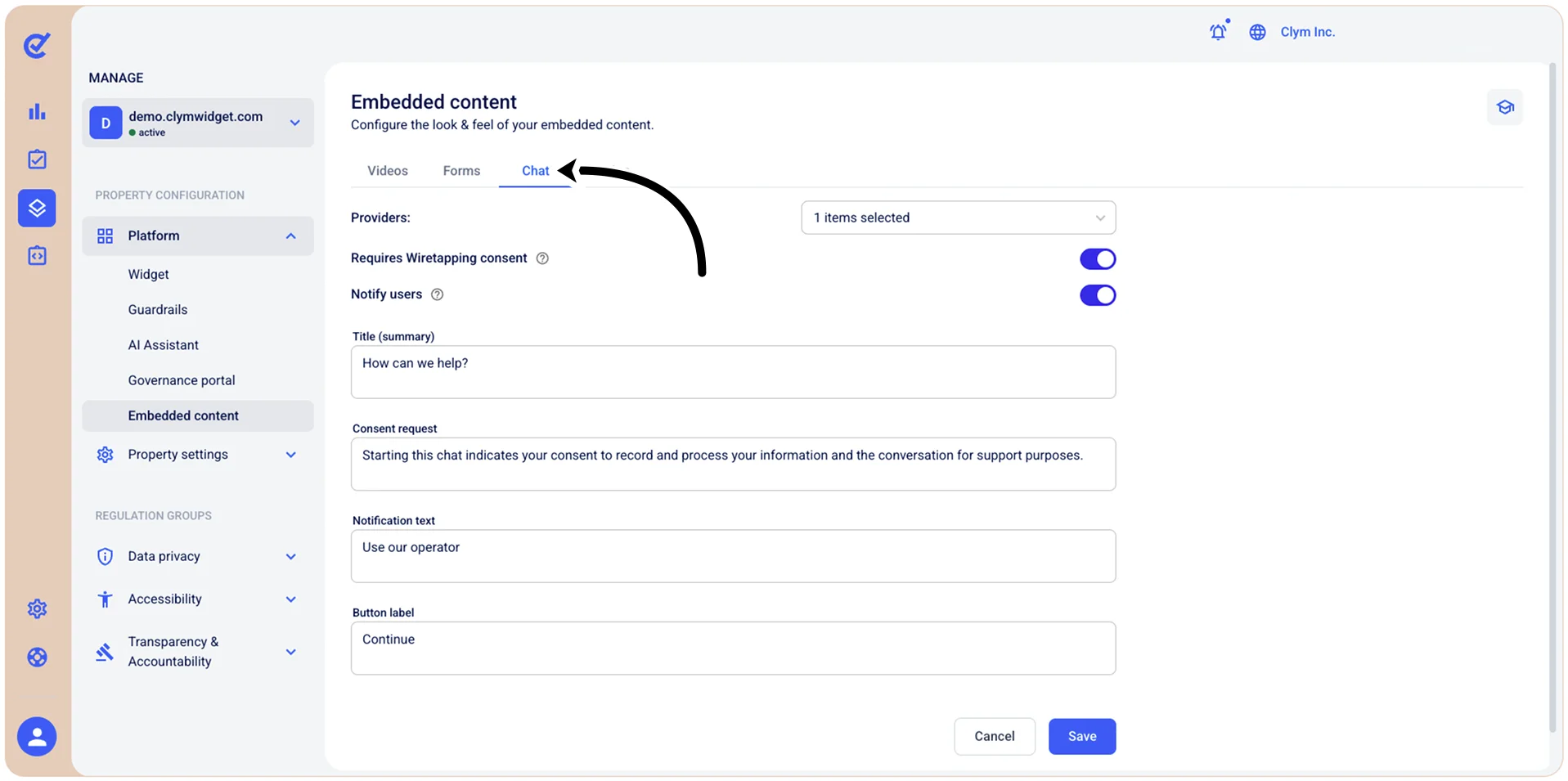
- Select the Chat tab and configure the details of the chat client, as follows:
- Providers: Select the desired providers from the list.
- Requires Wiretapping consent: Toggle on if you want to collect dedicated consent under wiretapping regulations.
- Notify users: Toggle on to let users know you can be contacted via chat for questions.
- Title: Enter the name of the chat.
- Consent request: Type the name of the consent request from your part.
- Notification text: Type the name of the
- Button label: Type the label of the chat button.
- (In every field where you can manually enter your own text) Edit translation: Select if you want to improve/update the translation provided.
- When finished, select Save.